

When one hidden object remains, repeating the same sweep often means repeatedly missing the same area. Change the task before clicking again. Search one part of the picture for one visual property, then move to the next part only when you have checked it deliberately.
Start by rereading the target. Decide whether the game wants a named object, a silhouette, or a small picture. A silhouette asks you to match an outline; a name asks you to imagine possible appearances. Those require different kinds of attention.
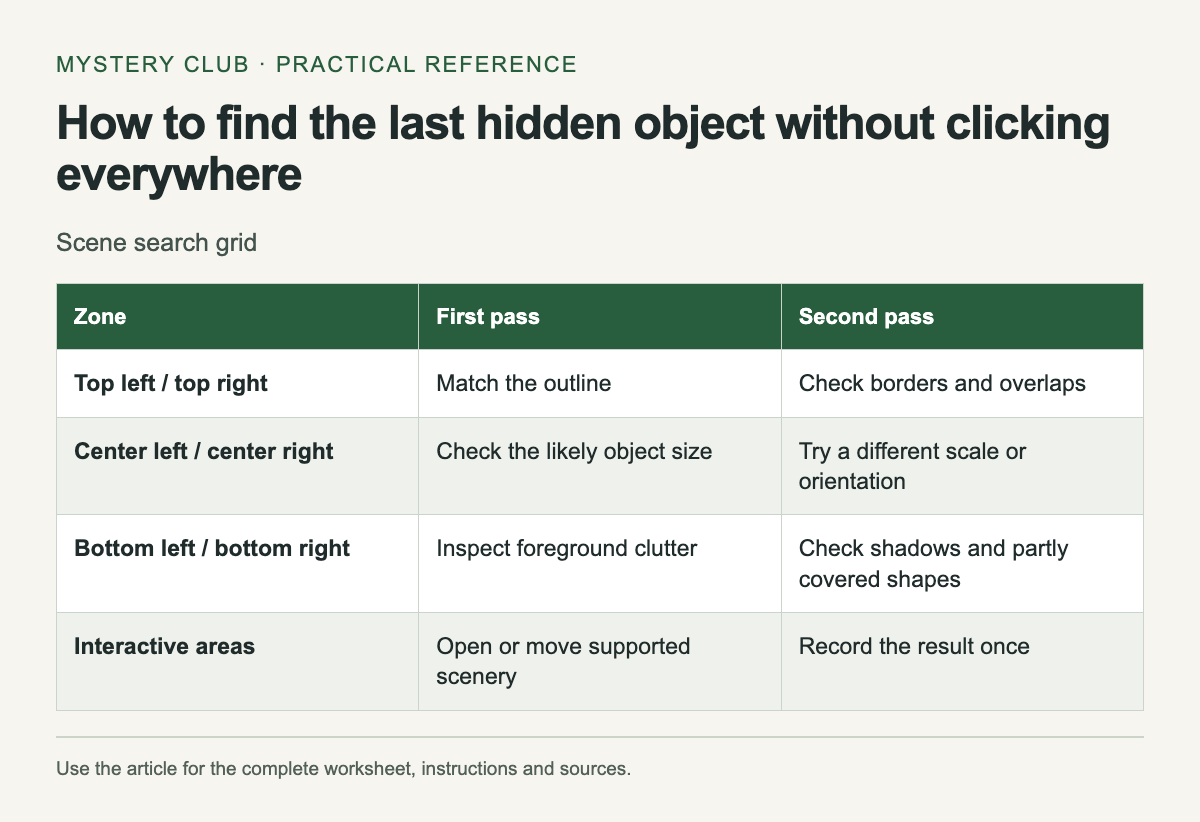
Divide the picture into zones
Scroll the table sideways on a narrow screen to see every column.
| Zone | First pass | Second pass |
|---|---|---|
| Top left / top right | Match the outline | Check borders and overlaps |
| Center left / center right | Check the likely object size | Try a different scale or orientation |
| Bottom left / bottom right | Inspect foreground clutter | Check shadows and partly covered shapes |
| Interactive areas | Open or move supported scenery | Record the result once |
The grid is an organizational aid, not a claim that objects are distributed evenly. You can draw it on paper without covering the game. Mark a zone only after inspecting its edges and background, then change the search property for the next pass.
Search for a feature you can recognize
If the target is a key, look for a shaft and an opening at one end. Do not restrict the search to the size or color of a house key you own. In a stylized scene, the object may be rotated, partly covered or much larger than expected.
For a written clue, list two plausible meanings before searching. A "bat" may refer to an animal or sporting equipment; the scene's theme can help, but it does not prove which meaning the game uses. If the target is a picture, compare the outer shape before trying to match tiny internal marks.
Check interactions once
An object may sit behind something that opens or moves. Follow the game's demonstrated rules for these interactions. Test an obvious drawer or curtain once, then note the result. Repeated clicking across the entire scene makes it harder to remember which areas you have actually inspected.
Interactive scenery is part of the developer's description of Hidden Folks. That example is a reminder to check a game's own instructions; it does not mean every hidden-object scene permits the same interactions.
Change scale without losing your place
If the game provides zoom, inspect a small section and then return to the full view. The close view helps with shape, while the wider view helps you remember where the section sits. Browser zoom and game zoom may behave differently, so prefer a control the game documents.
Try a supported display mode if contrast is the problem. Avoid promising yourself that changing brightness will reveal the answer; a pale object against a pale background may still be difficult to distinguish. Save the original settings so you can return to them after the check.
Use a hint when the search stops being enjoyable
A hint is a reasonable way to learn what kind of concealment the game uses. After finding the object, inspect why you missed it. Was it the wrong meaning, an unexpected scale, or a part of the image you never scanned? That observation is more useful for the next scene than treating the hint as a failed attempt.
If you would rather keep searching, step away and return with a different target feature in mind. There is no need to set a fixed waiting time or turn a relaxing game into an endurance exercise. Stop the session when you want to stop, and leave the grid beside your save so you can resume without repeating every zone.
For a different search format, see the Dark Parables selection.
Comments