

A hidden-object game can have no countdown in its scenes and still stop your session when a trial expires. Before downloading, check both the rules of play and the limits on access. "Relaxed" usually describes an experience the publisher intends; the actual settings tell you whether that experience fits you.
Start with the thing that makes a timer unpleasant. Is it failing the level, seeing a score fall, or watching a hint button slowly refill? Those are different problems. A mode that removes failure can leave the other two in place.
Two hidden-object games with no time limit
Start with these two games if you want an untimed search. Their developers explicitly describe the absence of time limits. These are recommendations based on those published features, rather than reports of a personal playthrough.
Hidden Folks: for searching without a score
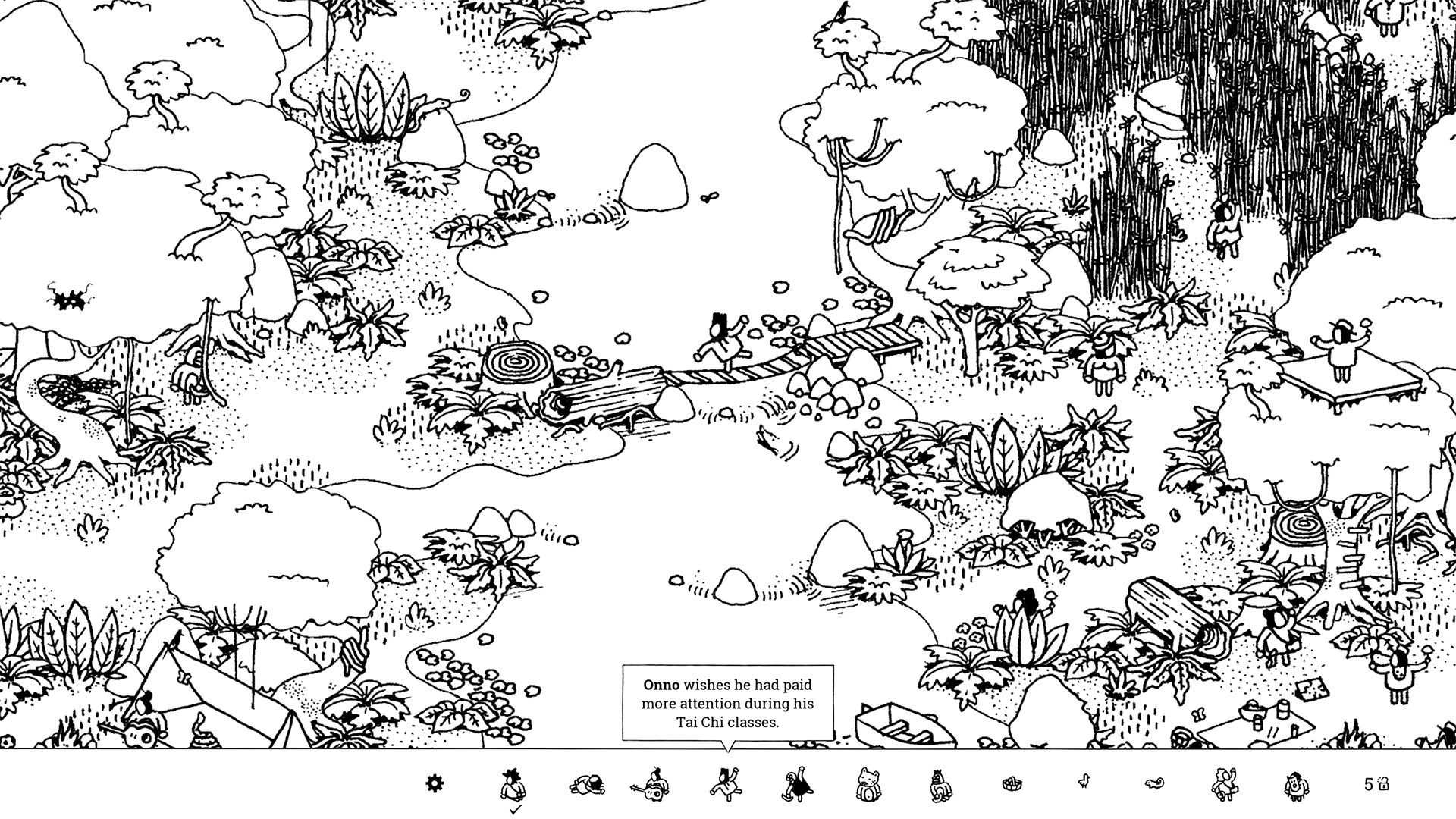
Official store screenshot. Open the image for a larger view.
The developer explicitly confirms that there are no time limits or points. You search interactive, hand-drawn scenes: opening a flap or moving something can matter as much as spotting a tiny shape. I would start here if a falling score is as distracting as a countdown. The monochrome scenes can still be visually dense; open the screenshot before choosing.
Heartreasure: Stellar Journey: for object hunting with small mechanisms

Official store screenshot. Open the image for a larger view.
The developer describes a world without time limits, where you find hearts and solve mechanisms to reach further planets. Choose this if you want little puzzles between searches. I would choose Hidden Folks instead if those extra mechanisms sound like an interruption. Its Steam edition lists Windows and macOS support; check the requirements for your machine.
| Game | Reason to choose it | Check before buying |
|---|---|---|
| Hidden Folks | Interactive scenes without points or time limits | Whether the dense black-and-white artwork is comfortable to read |
| Heartreasure: Stellar Journey | Hidden hearts, mechanisms and travel between planets, without time limits | Whether you want puzzle-solving alongside object hunting |
For a concrete first choice, I would use Hidden Folks when the aim is simply to search without being scored. Choose Heartreasure when discovering how a mechanism works is part of the appeal. Neither recommendation means every other game labelled “relaxing” has the same rules.
For other games, use our hidden-object demo checklist and the timer checks below.
Identify the clock
Scroll the table sideways on a narrow screen to see every column.
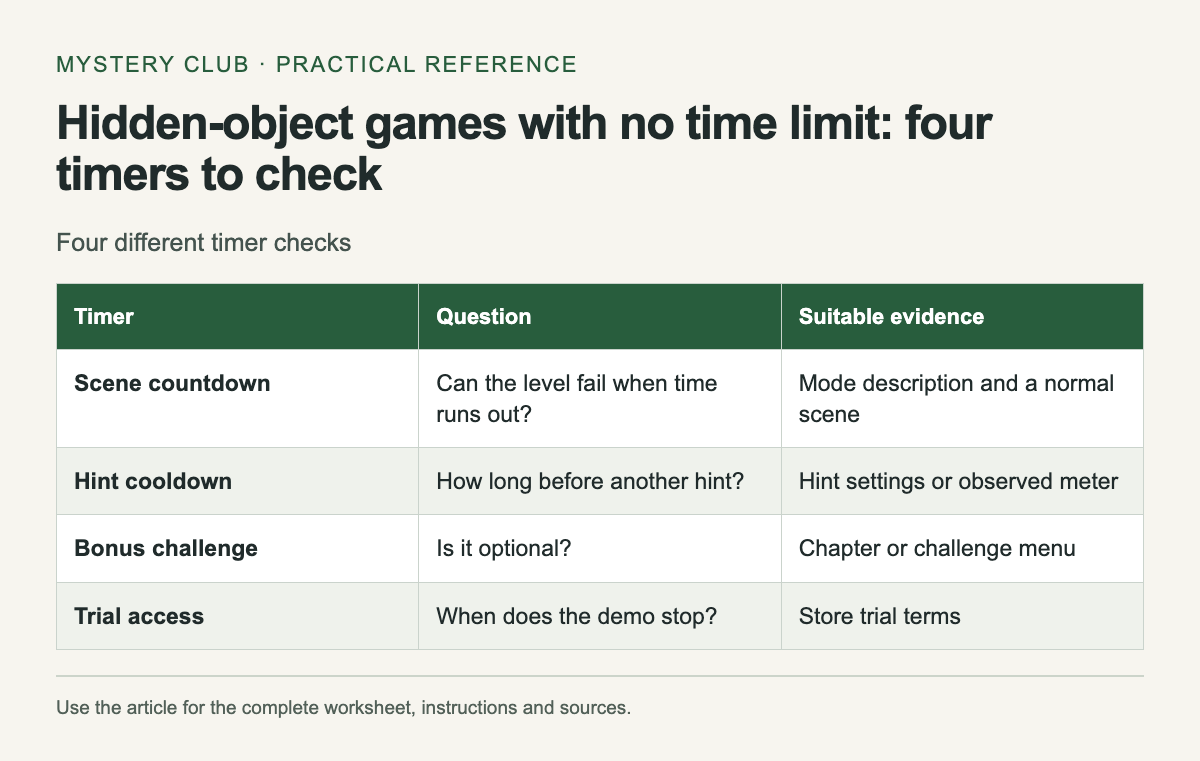
| Timer | Question | Suitable evidence |
|---|---|---|
| Scene countdown | Can the level fail when time runs out? | Mode description and a normal scene |
| Hint cooldown | How long before another hint? | Hint settings or observed meter |
| Bonus challenge | Is it optional? | Chapter or challenge menu |
| Trial access | When does the demo stop? | Store trial terms |
Copy the wording from the settings screen into your notes. "No time limit" is useful evidence for that mode. "Casual" is less precise unless the accompanying description explains what changes. Do not assume that choosing a low difficulty automatically removes every timer or penalty.
Try waiting on purpose
In a demo, stop touching the controls for a short interval during a normal scene. Watch whether a clock continues, an object disappears, or a score changes. Then make one mistaken click, if the game permits it without spending money, and see what the interface reports. You are checking the rules, so there is no need to rush through the scene.
Open the pause menu as a separate test. A game that keeps running behind a menu may be awkward if you need frequent interruptions. Do not infer pause behavior from the fact that the menu covers the picture. Resume once and confirm the state of the level before relying on it.
Read trial terms separately
A trial can limit minutes of access, chapters, features, or a combination. Check what happens to progress when you buy the full version. Never assume a trial save transfers between stores or devices; find a statement from the publisher for the edition you are using.
A refund policy is another separate matter. Steam's policy generally allows game refund requests within fourteen days when playtime is under two hours, with conditions and exceptions. It is not an unlimited demo license, and leaving a game running can use the time you intended to spend checking it.
A useful relaxed-mode test
Choose a scene you have not already solved. Read the targets, inspect the image and use a hint if you want one. Ask whether you can leave one difficult object until later without losing the level. That is often the practical difference between a pleasant search and a session dominated by the clock.
If a bonus challenge has a timer, establish whether it blocks the main game. Optional timed content may be acceptable when your normal route stays untimed. Keep this detail in the comparison instead of reducing the entire game to one yes-or-no label.
Keep a note for future purchases
Record the game, platform, mode name and date you checked it. Add a sentence about what remained timed. This prevents a relaxed-mode recommendation for one edition from becoming an unsupported claim about every version.
For a shared computer, also check whether difficulty belongs to the player profile or the whole installation. Start a separate profile if the game supports it, and confirm the chosen mode before handing over the controls. A saved preference is more reliable than remembering which menu was used last time.
Check bonus content separately with the Collector’s Edition versus standard guide.
Comments